A development studio where the code never leaves the building.
In one paragraph
Nessie is three things in one system: a project-management tool, a project-development tool, and a software-development tool. Work is planned as tickets on a board. The people doing that work are your engineers and a set of AI colleagues who sit at the same level as any other member of staff — they have names, job titles, a person answerable for them, their own email addresses and their own phone numbers. When a ticket moves into development, the actual compilation and editing happen in a Claude or Codex session on a machine you own: an engineer's Mac, a Windows bench box, a Linux HIL host. Source code never leaves your network. Everything every agent reads or writes is gated by project access and recorded in an audit trail that names the actor.
The claim this document makes is that a team of ten can carry the work of a hundred. The mechanism is in the sections below, the evidence is in the screenshots, and the cost — which is real — is in the last section but one.
About the screenshots. Every picture in this document was taken from a running Nessie instance, by an automated capture run against a live database. The project, the people, the supplier and the part numbers are invented and carry an .example domain. No Digiteq data was used and nothing was mocked up: if a screen in this document shows a feature, the feature exists and renders exactly like that. Where something could not be captured, this document says so rather than drawing it.
1. The project is the unit of work
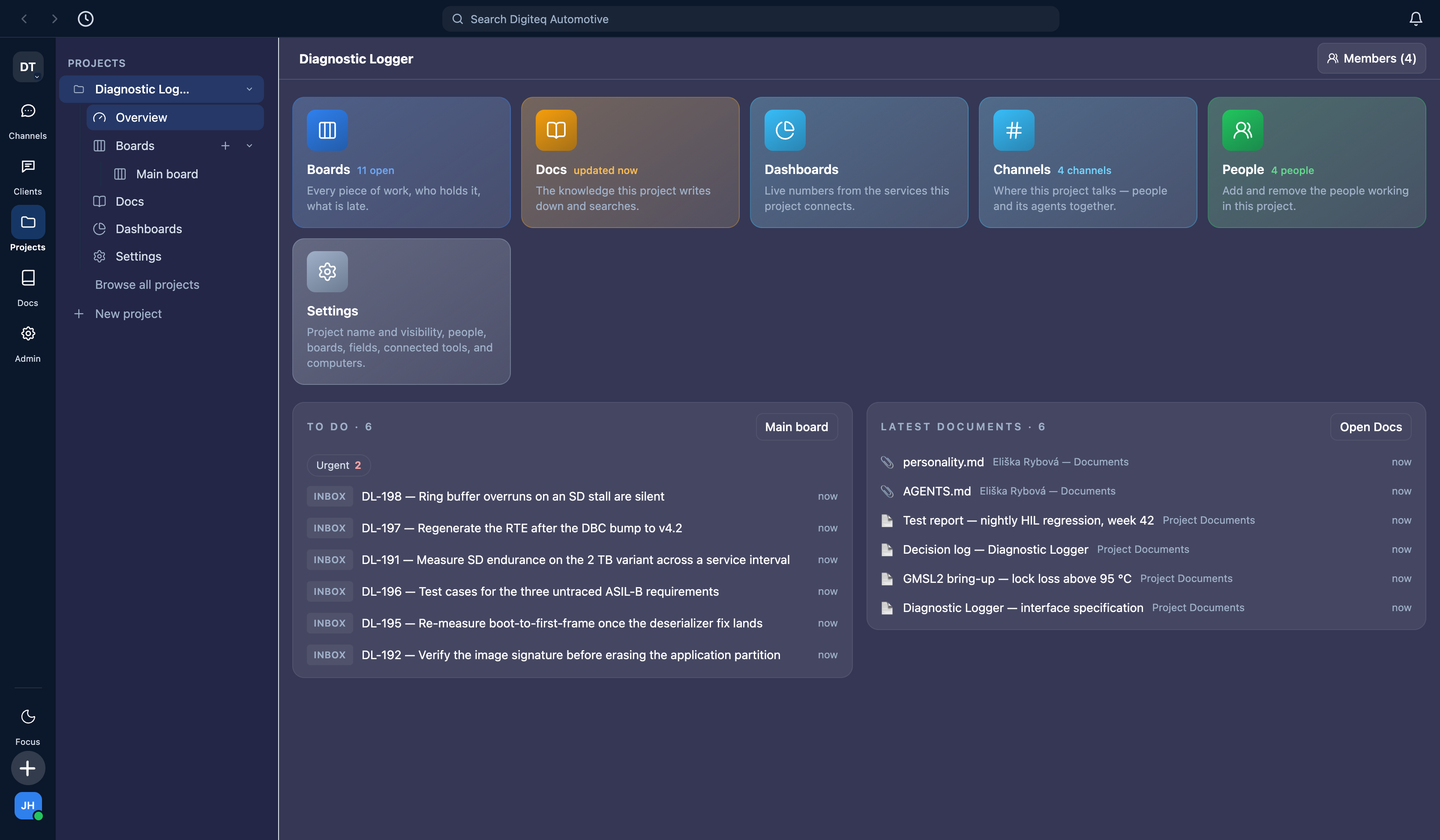
Everything hangs off a project: its boards, its documents, its channels, its people, and the machines it is allowed to use. A person with access to the project sees all of it. A person without access sees none of it — including an organisation owner who is not in the project's team, because teams in one organisation are wholly independent of each other by design.
The project's own front page: boards, documents, dashboards, channels, people and machines in one place, with what is open and what changed most recently.
The board
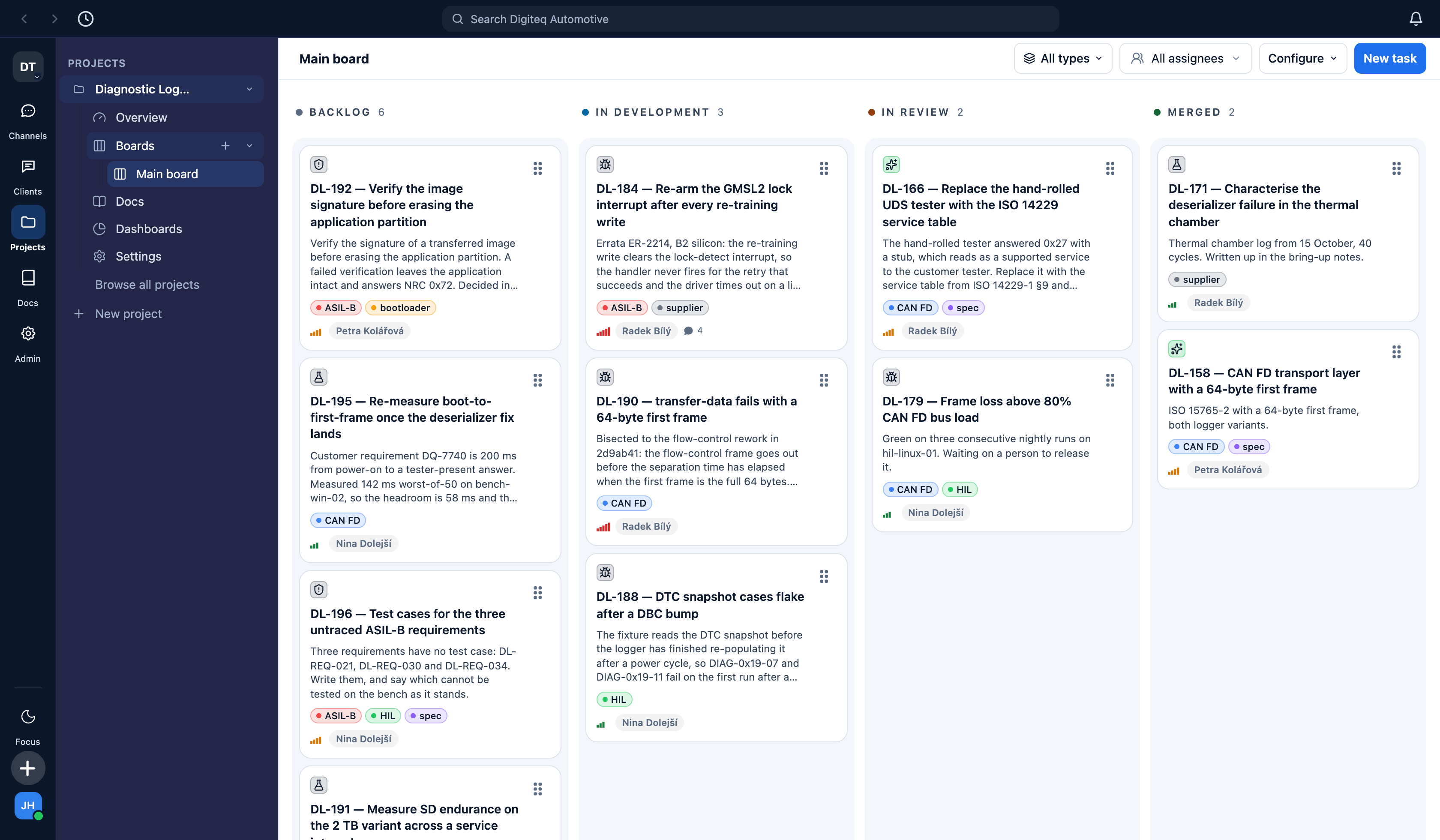
An ordinary Kanban board. Tickets carry a type, labels, story points and an assignee — and the assignee is a person on some cards and an AI colleague on others. The board is configured per project: these four columns were named by the team, and each one is bound to a lifecycle category so that moving a card updates the ticket's status.
A board column can be configured to start work. Drag a ticket into In development and it is picked up by the agent that holds it, on the machine that project is allowed to use. That is the whole interaction: the planning gesture an engineering manager already makes is the gesture that dispatches the work.
The ticket
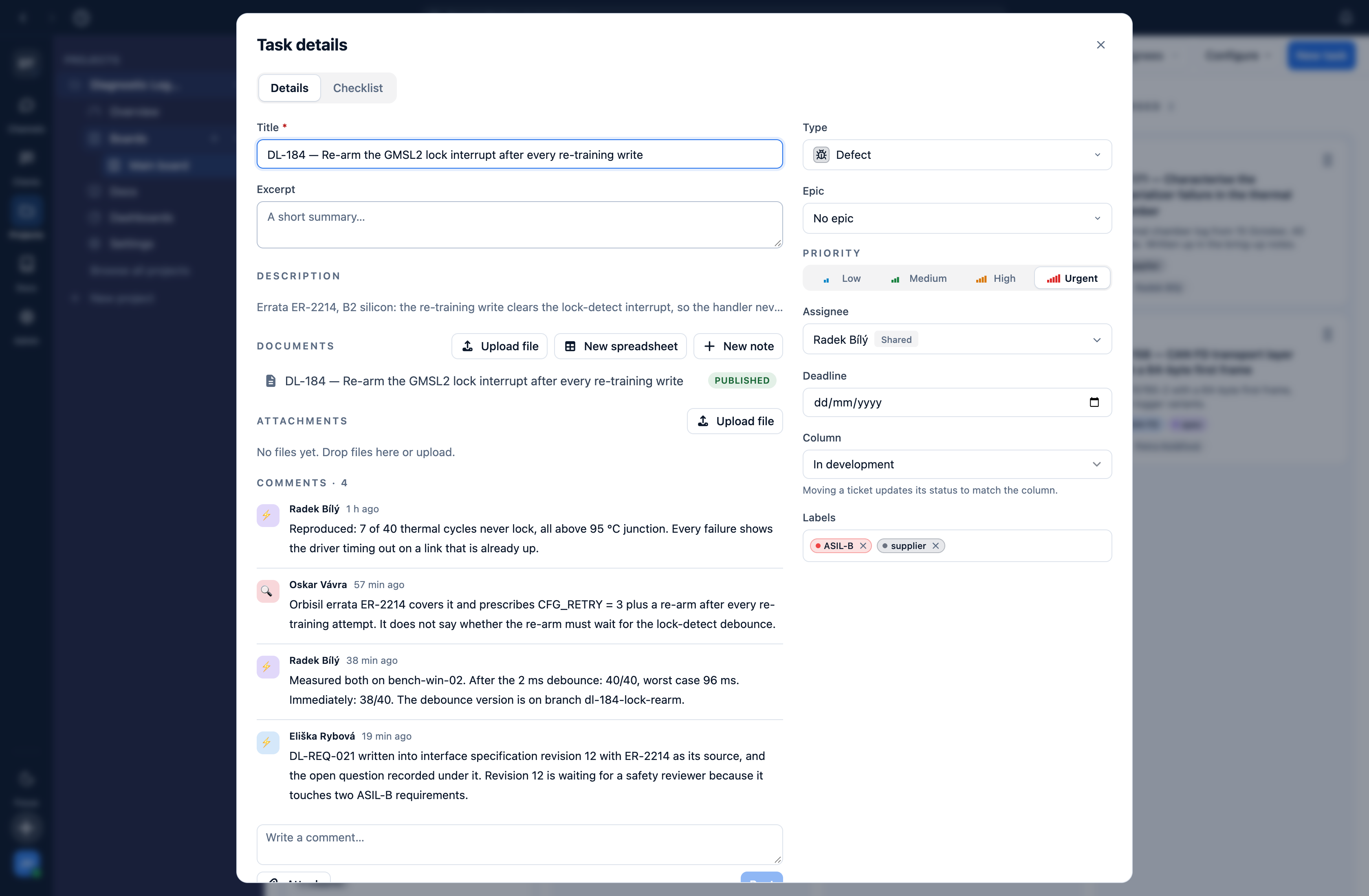
One ticket. Description, checklist, type, priority, labels, assignee, column — and a comment history in which the engineer who measured the problem and the agents that found and specified it appear side by side, each by name. The comments here were written by three different agents; the product does not need a person to transcribe anything.
2. Agents are staff, not a chat box
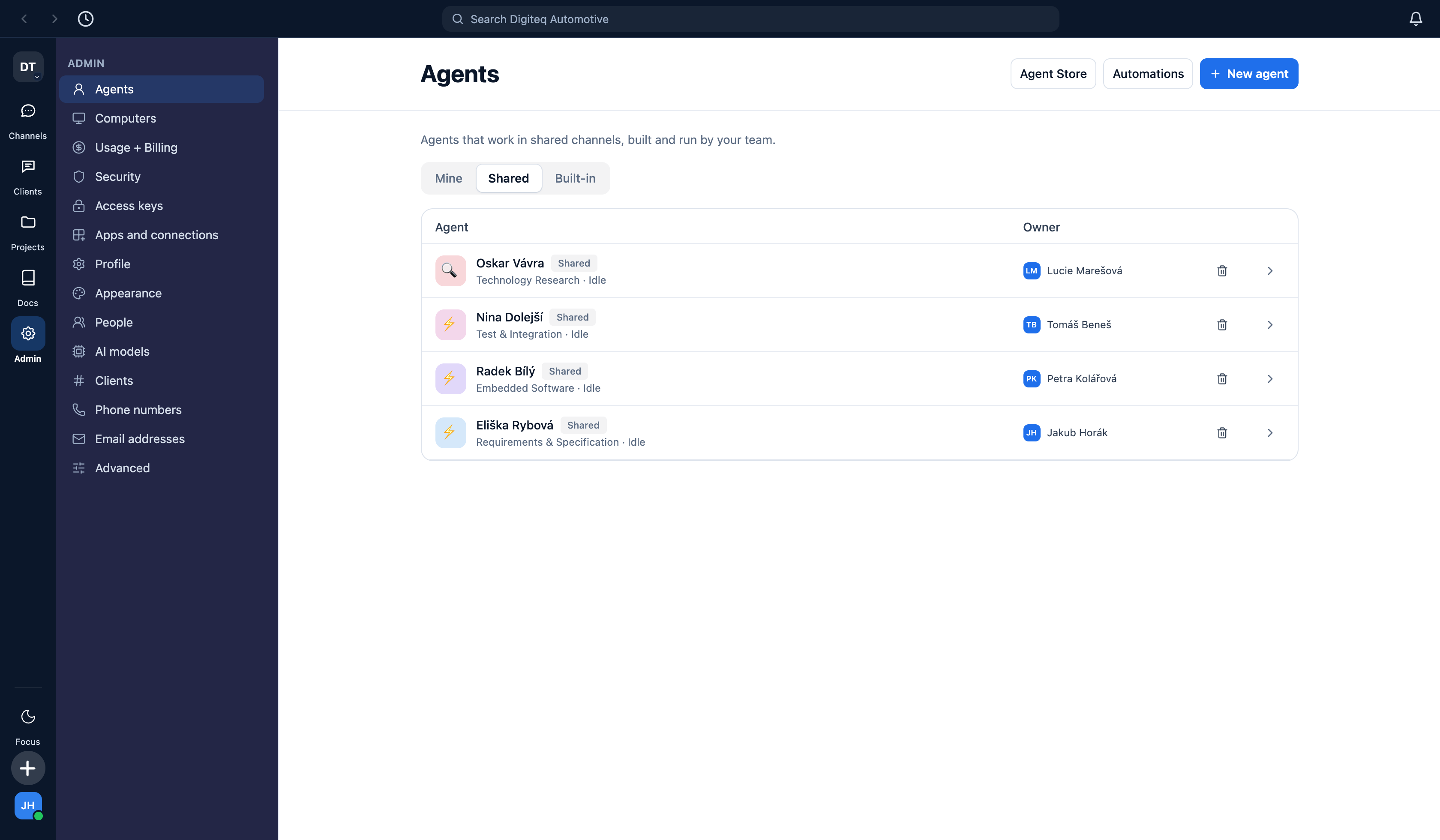
The easy thing is to read past this, so plainly: an agent in Nessie is a record of the same kind as an employee. It has a name and a job title. It has an owner — a named person who is answerable for it. It belongs to a team and to projects. It appears in the roster. It is in some rooms and not others, and what it may read is decided by the same access rules that decide what a person may read.
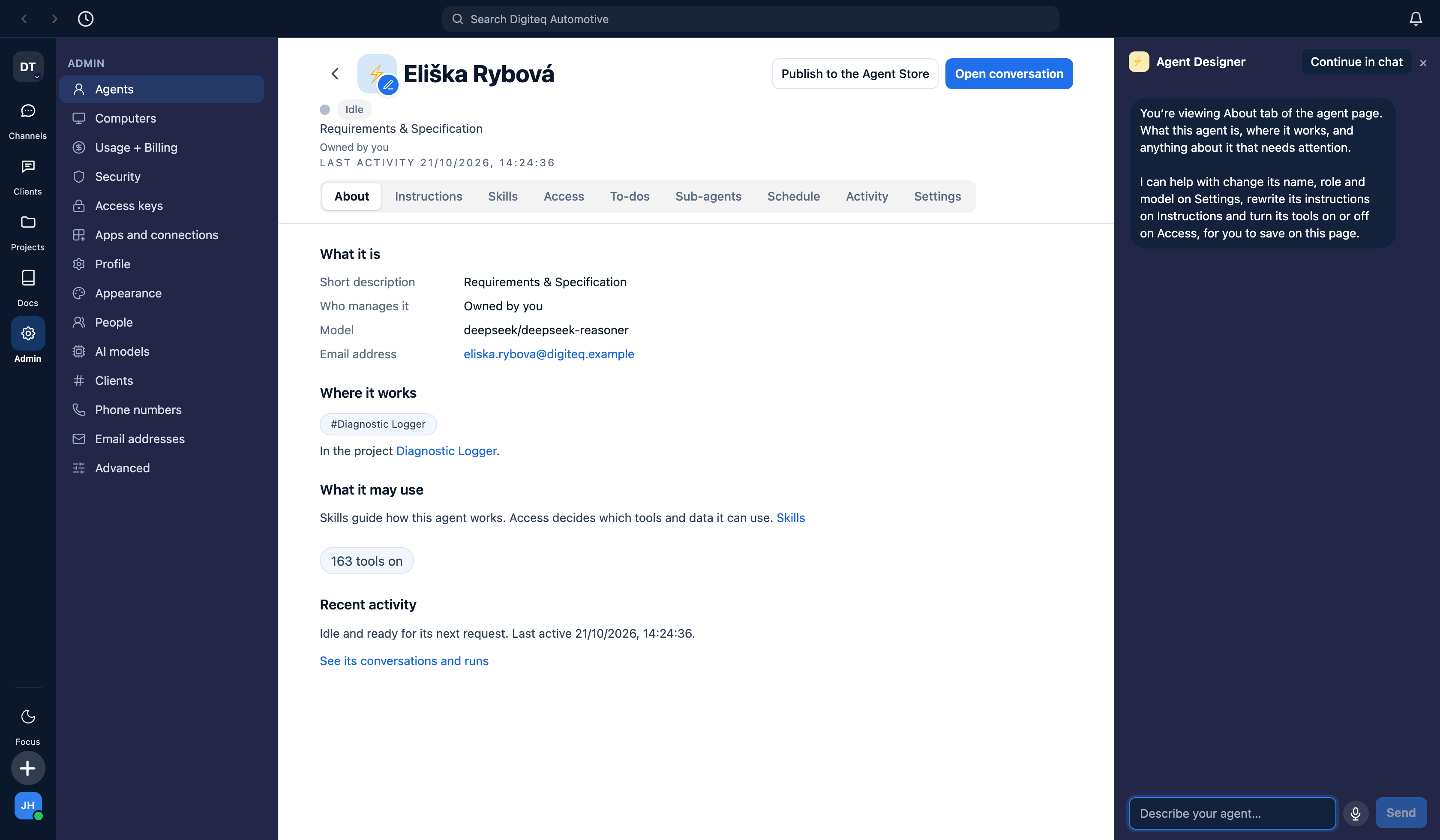
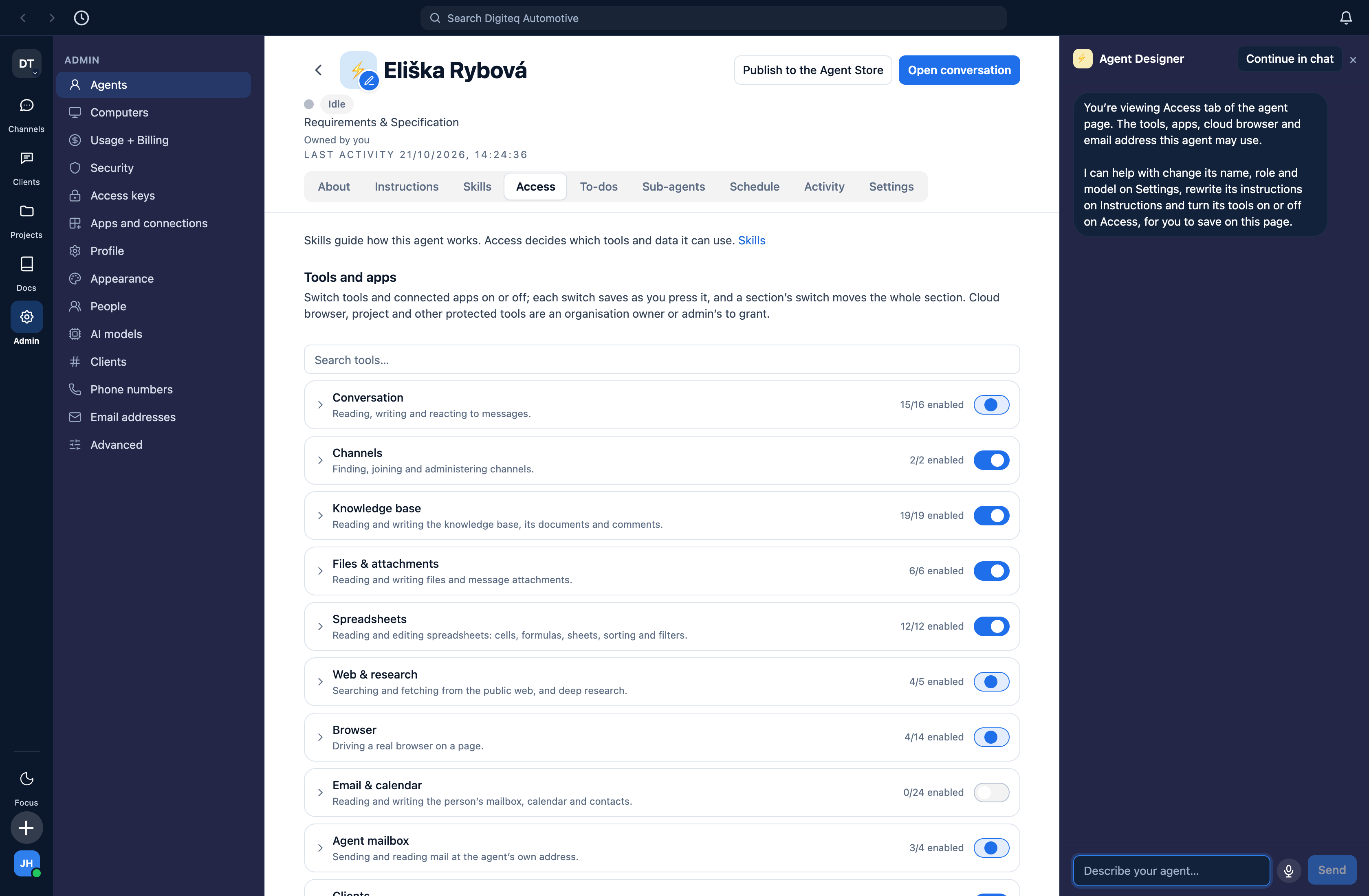
Four agents, each with a role and a named human owner. This is a roster, not a model picker.What one agent is: its job, its owner, the model it runs on, its email address, the rooms it works in and the project it belongs to. The panel on the right is the Agent Designer — see section 7.And what it is allowed to do. Every tool and every source of data, grouped, counted and switchable. "Email & calendar: 0/24 enabled" is not decoration — that agent genuinely cannot read anyone's mailbox. Cloud browser, project and other protected tools can only be granted by an organisation owner or admin.
3. Reachable the way a colleague is
Because an agent is a member of staff, it is reachable like one.
It has its own email address. Mail arrives at that address from outside the company and is answered from it.
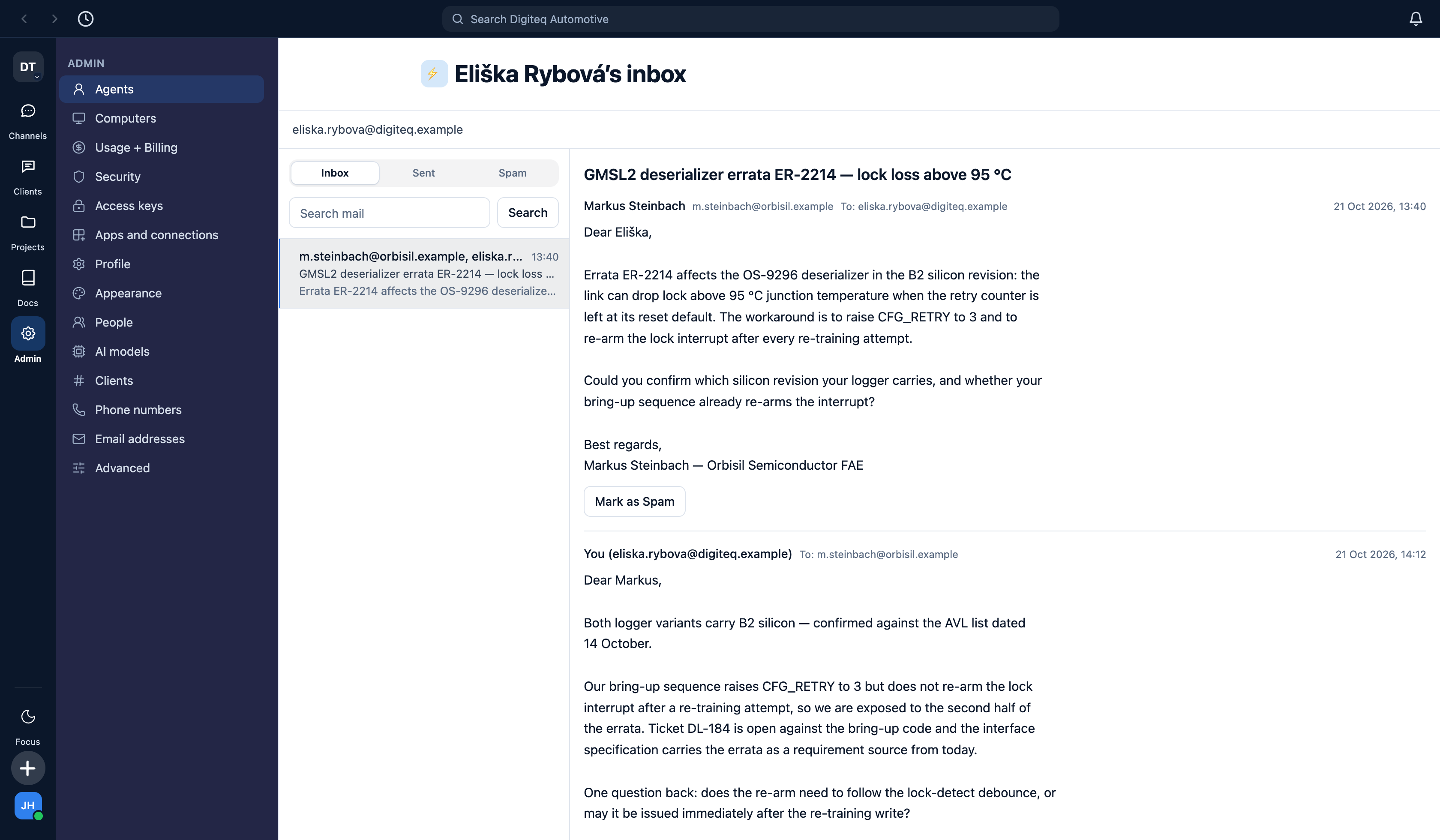
A supplier FAE writes to the specification engineer's own address about a silicon errata. The reply names our silicon revision and an open defect, so it is held for a person to read before it leaves the company — that is the default for an agent mailbox, not a setting someone remembered to turn on.
You can put an agent on a mail thread the same way you put a colleague on one. Add the agent's address to a thread with a customer, a supplier or another part of the Group, and say Eliška will take this one. That sentence is the grant: from that moment the agent has the thread, the context it needs to answer, and the boundary of what it may say — because what it may read is already decided by its project access, and what leaves the company is already gated by the approval rule on its mailbox. You did not configure anything. You did what you would have done with a junior engineer.
It has a phone number, and that changes the day. Press the call button in a conversation and you talk to the agent. Give it a real number — bought inside Nessie from the telephony provider, Czech and UK numbers in the current rollout — and the same colleague is reachable from any handset: it answers SMS on that number, and telephone calls run over an admitted Twilio bridge. (WhatsApp exists in the data model but is not yet connectable; the product's own dialog says "Not available yet." It is not claimed here.)
Why this matters more than it sounds
The honest argument for this is not capability, it is quality of life. An engineering manager spends a large part of the week being the transport layer between people — repeating a decision to someone who was not in the room, chasing a status, writing up what was agreed, forwarding a supplier answer to whoever needs it. All of that is work that has to happen and that nobody enjoys.
With agents that are reachable like colleagues, that work can happen while you are driving to a meeting. You call the agent on the way, in Czech, the way you would ring a colleague, and ask where the logger build stands. It tells you, and it tells you what it is blocked on. You say tell Petra the thermal slot moved to Monday and put it on DL-195 — and it does both: the message and the ticket. You ask it to reply to the supplier confirming the silicon revision, and the draft is waiting for someone to release when you arrive. Nothing is sitting in your head waiting for you to reach a keyboard, and nothing has been written down twice. The week stops being a relay race.
4. The work is written down where the work is
A project's documents live inside the project. They are not a wiki somewhere else that a person is supposed to keep in step by hand.
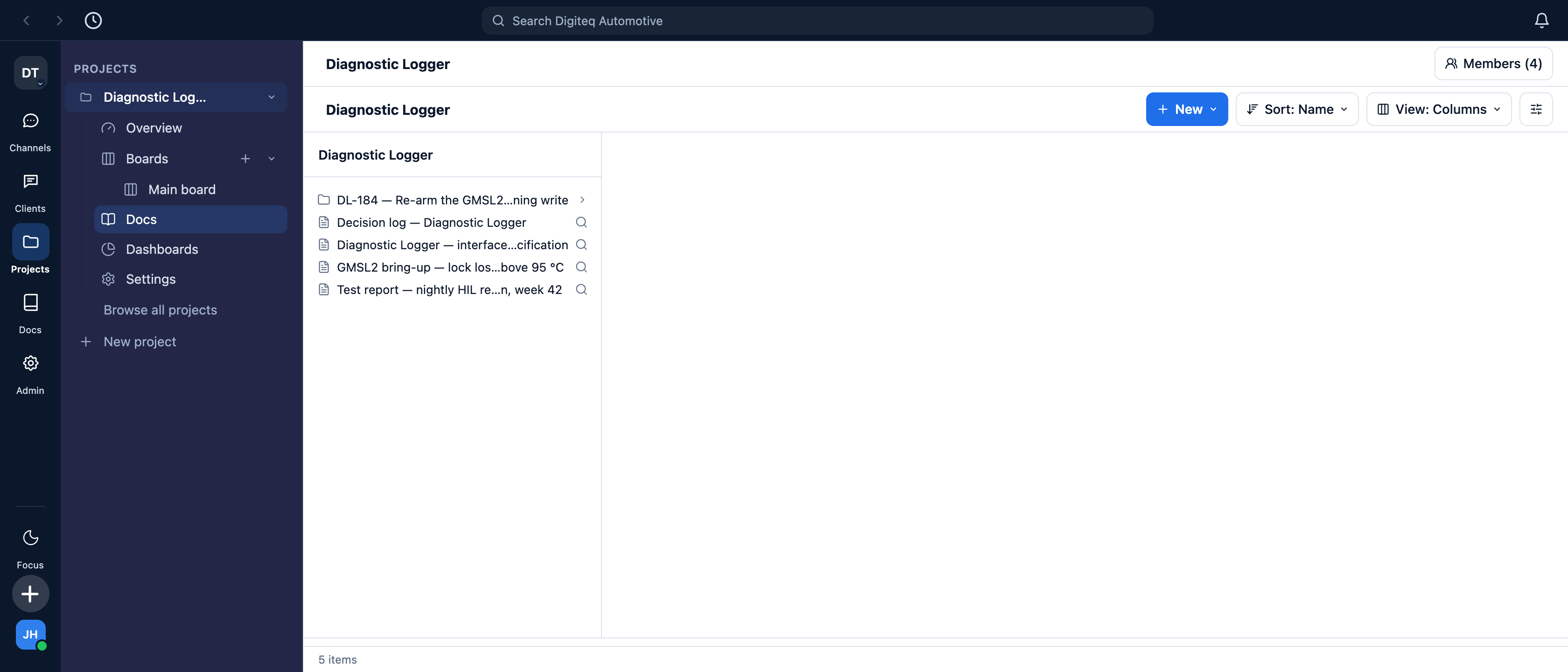
The documents of one project: the interface specification, the bring-up notes, the decision log, the test report — and a folder of documents belonging to one ticket. Each one is readable by exactly the people the project is readable by.
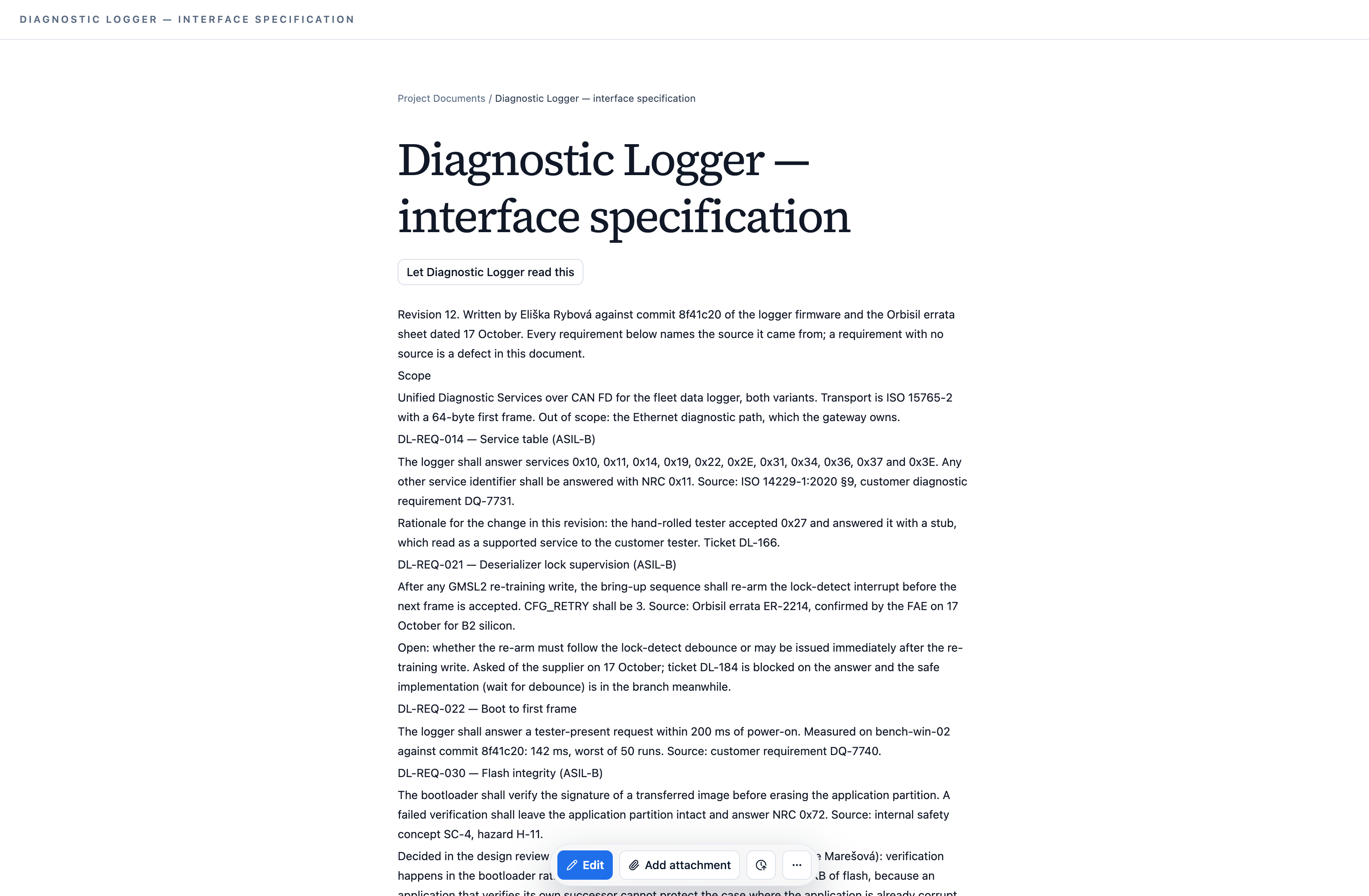
The important property is not that agents can write documents. It is what they write. An agent that sat in a thread, or listened to a meeting, does not produce a transcript. It works the content into the document that owns it: a decision becomes a requirement with a source, a measurement becomes a rationale, a disagreement becomes a ticket.
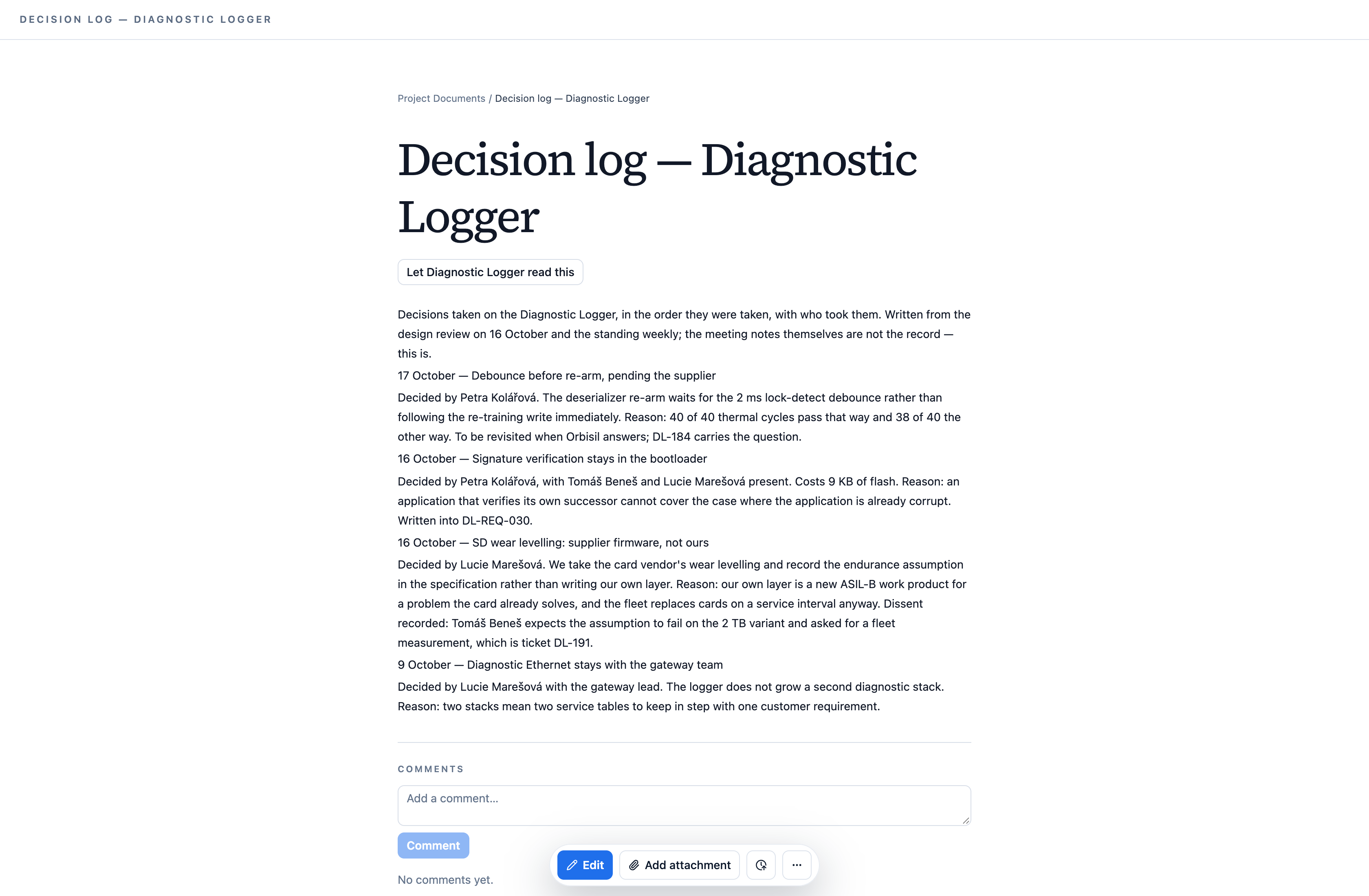
Revision 12 of an interface specification, written by an agent. Every requirement names the source it came from — a standard clause, a customer requirement, a supplier errata — and what is still open with the supplier is written down as open, with the ticket that is blocked on it. For an ASIL-rated work product, "where did this requirement come from" is the question an auditor asks; the document answers it because the agent that wrote it had both the thread and the errata.The decision log for the same project. What was decided, by whom, why — and the dissent, recorded with the ticket it turned into. Nobody typed this up after the design review; the agent that was in the room wrote it the same day and tied it back to the requirement it changed.
Meanwhile, the work keeps moving without anyone on call:
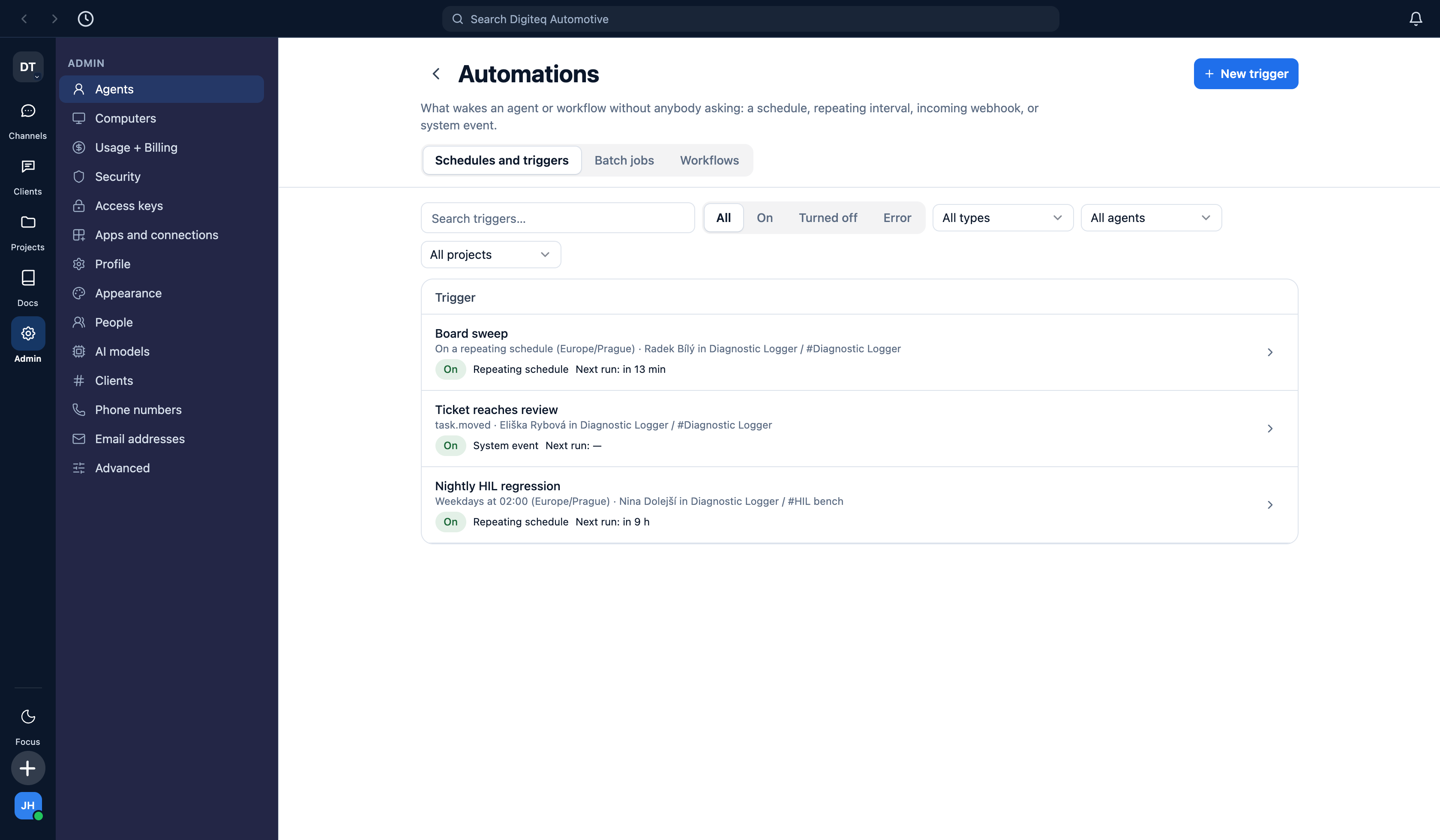
A nightly HIL regression at 02:00, a sweep of the board every half hour during working hours, and a re-read of the specification whenever a ticket reaches review. Each one belongs to a named agent, in a named room, in a named project.
5. Research is part of the job
Every agent can reach an internal deep-research capability: a bounded, cited investigation of a technical question — which library, which approach, what the standard actually requires, what the licence allows, whether the part has published errata. This is the legwork a developer would otherwise do by hand, and in the thread above it is what turned "the deserializer sometimes does not lock" into "errata ER-2214, B2 silicon, and here is what it prescribes."
It is off by default and granted per agent, because research calls an external service and costs money.
Not captured. The research surface needs a live connection to that external service, which a local capture run has no business holding. There is therefore no screenshot of it in this document, and none has been drawn. It is the one capability here shown only in the thread that used it.
6. The code never leaves the building
This is the section that decides whether Nessie is usable inside a Volkswagen Group company at all.
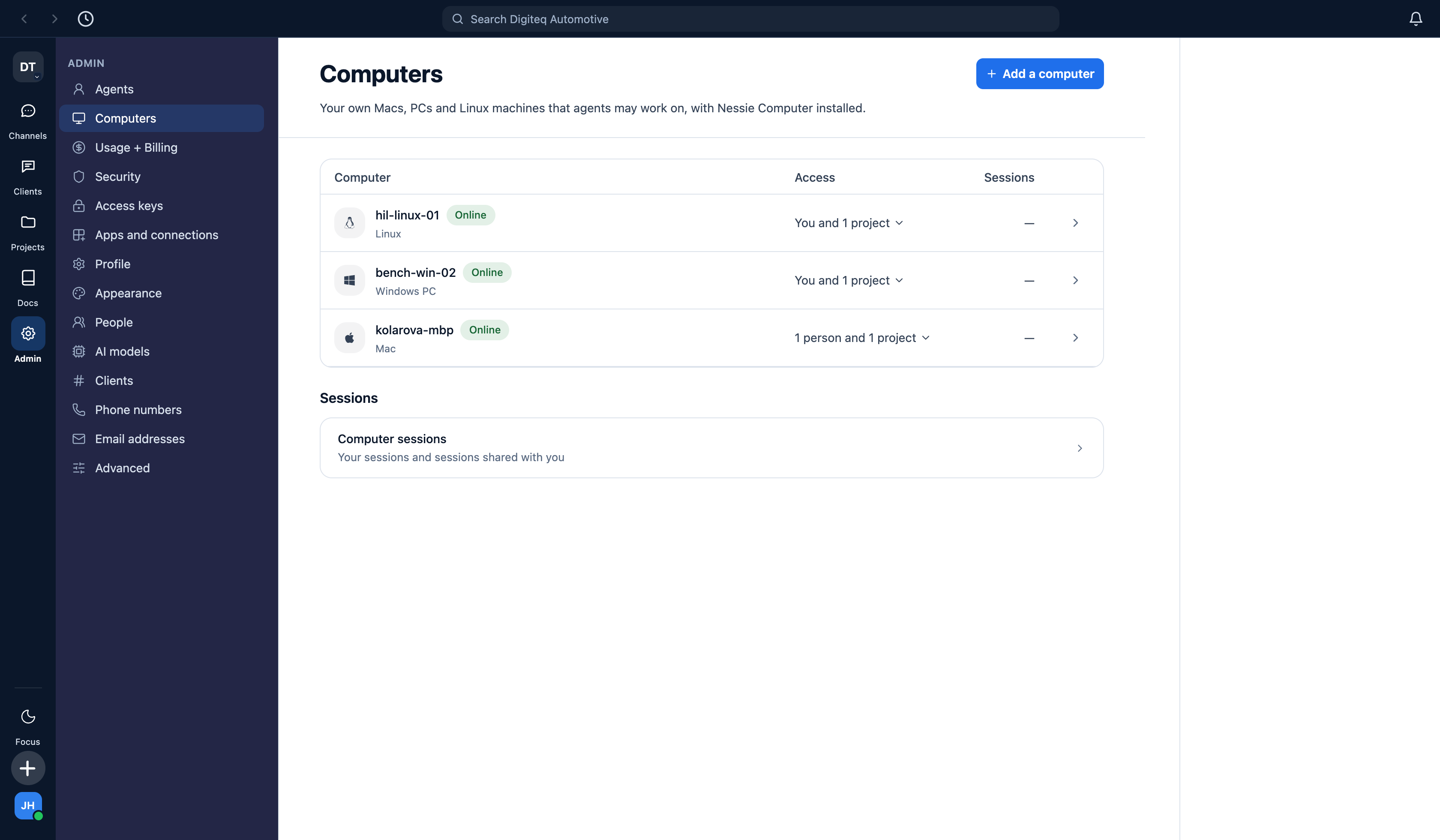
Nessie does not upload your repository anywhere. The editing and compiling happen in a coding session on a machine you own, paired to your organisation. Mac, Windows and Linux.
Three paired machines: an engineer's Mac, a Windows bench box and the Linux HIL host. Each one says who may use it and which projects it is available to. A ticket dispatched from the board becomes a session on one of these.
What this gives you, concretely:
Source stays on your network. The agent drives a session on your hardware; the model sees what the session sends it, under your own policy, and the working tree never moves.
The toolchain is the one you already have. Your compiler, your flashing tools, your HIL bench, your licences. A bench box that can build the logger today can build it for an agent tomorrow, because it is the same box.
It works where your engineers work. Developer laptops, dedicated build machines, or both. The same project can use all three platforms at once.
A machine is granted, not assumed. Each computer names the people and the projects that may use it. Narrowing it is one change in one place.
7. When an engineer does not like what an agent did
They tell it, and it changes.
Every agent carries a set of written instructions and an access list. Both are editable by hand on the pages in section 2 — but the ordinary path is the Agent Designer panel visible on the right of those screenshots. An engineer who sees an agent widen a ticket's scope, or write a requirement without a source, or touch a file it had no business touching, says so in plain language in that panel. The Designer rewrites the instruction or turns the tool off, and the change is saved for next time. It acts only with the authority of the person asking, so an engineer cannot grant an agent something they do not have themselves.
This is the loop that keeps the system improving rather than drifting. In most tooling a bad output produces a complaint. Here it produces a configuration change, made by the person who noticed, in the two minutes they noticed it.
8. Everything is gated, everything is recorded
Two separate properties, and the second does not substitute for the first.
Gated. A project is the access boundary. A team is the data boundary, and teams inside one organisation are wholly independent: no project, channel, conversation, agent, document, ticket or search result crosses between them, not even for an organisation owner. "Public" means public within the team. Agents are subject to exactly the same rules as people, and the check runs on the call, not on the screen that drew the button.
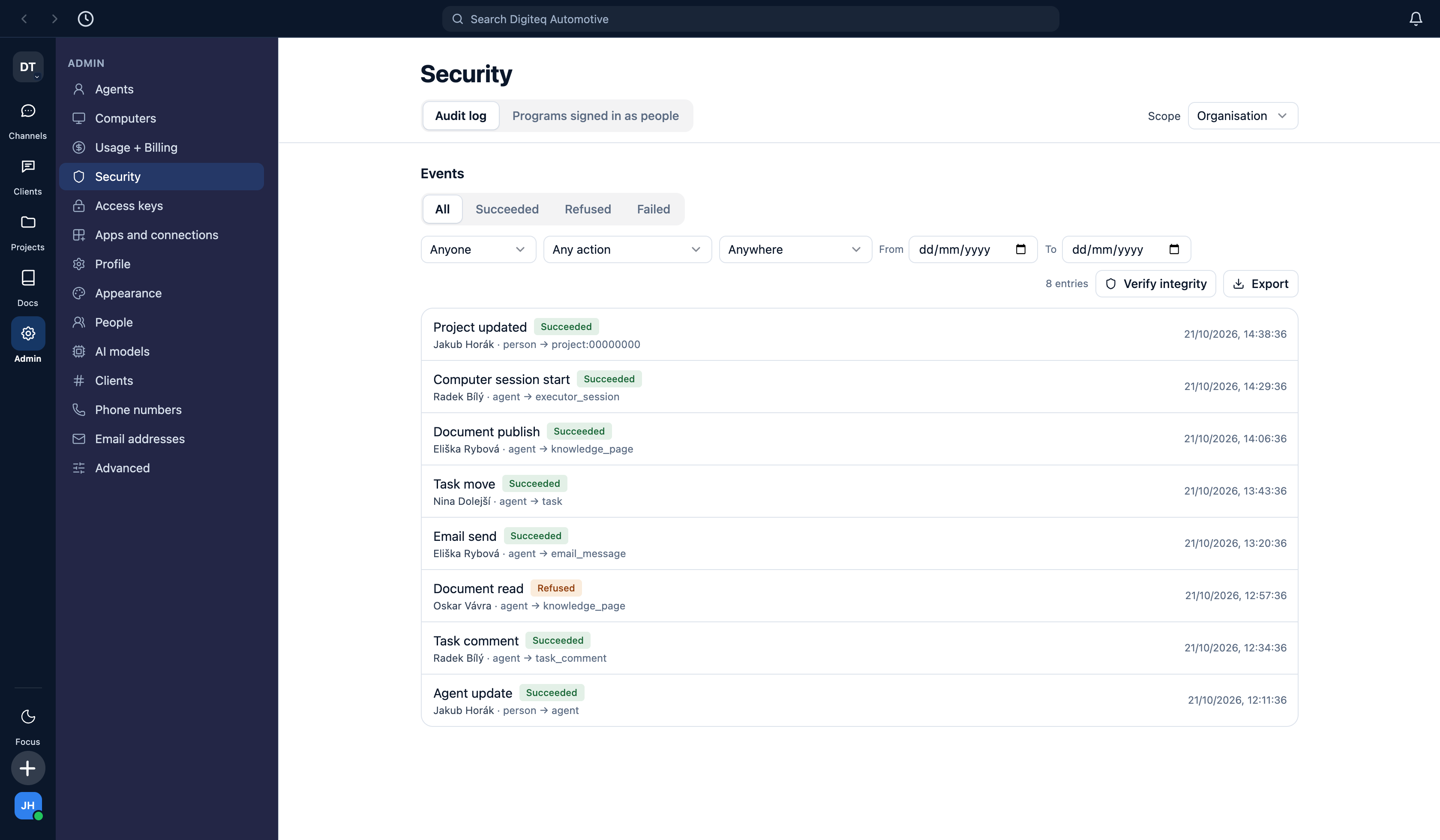
Recorded.
Every row names the actor — person or agent — what it touched, and whether it was allowed. The refused row is an agent reaching for a document in a project it is not a member of. The trail is filterable by person, action and project, it exports, and "Verify integrity" checks the chain rather than asking you to trust the list.
For an ASIL-rated work product this is the point. "Who changed this requirement, when, on what evidence, and who released it" has to be answerable months later. It is answerable here because the record is written by the system that did the work, not by whoever remembered to log it.
9. What it costs, honestly
There is a real cost, and it is tokens. These model APIs are billed per call, every call. A busy agent working a hard ticket costs noticeably more than an idle one, and an organisation that uses Nessie to generate documents nobody reads pays for every one of them. Usage is metered and visible per agent and per run, and a budget stops a run rather than surprising you at the end of the month.
The comparison that matters. Set the token spend of the work the agents actually completed against the loaded cost of the engineer-months that work would otherwise have taken. Our position is that for software development done properly, the token cost comes in at a tenth of the people cost or less — and that the leverage is ten times the throughput, not ten percent. We are not asking you to take that on faith. It is measurable, it differs by team, and the honest way to find your number is a bounded pilot on one real project. Measure it, and keep the number.
What "properly" means. The waste case is treating this as a text generator: asking for documents nobody reads, long answers where a short one would do, agents running on schedules that produce nothing. The productive case is the one in this document — tickets with a defined done, research that answers a question somebody actually had, specifications that are updated because a decision changed, builds that run on your own hardware overnight. The cost difference between those two uses of the same product is very large.
This is not a ChatGPT you talk into. A chat window produces text and leaves the organising, the recording, the dispatching and the remembering to you. Nessie holds the board, the documents, the access rules, the audit trail, the machines and the mailboxes, and the model work happens inside that structure. The structure is what turns model output into delivered work — and it is also what stops the spend going into things nobody will read.
10. What a pilot looks like
One real project, one board, three or four agents, six to eight weeks.
Stand it up. Self-hosted on your infrastructure, or hosted — your call. Sign-in through your existing identity provider. One team, one project.
Pair two machines. One developer laptop and one build or bench box, so that the "code stays inside" property is tested rather than described.
Put a real backlog on the board — ideally one with an unglamorous, well-understood piece of work on it, because that is where the throughput claim is easiest to read.
Give the agents jobs, not prompts. A specification owner, an implementer, a test-and-integration owner. Owners named, access narrow.
Measure three numbers. Tickets closed per week against your current baseline; token spend for the period; and the time your engineers spent on coordination rather than engineering, before and after.
At the end you will have a number for the second section of this page, taken from your own project rather than from ours.
In short
Project management
Boards, tickets, documents, channels, people — one project, one access boundary.
Project development
Decisions, specifications and test reports written where the work is, by the agents that were there.
Software development
Claude and Codex sessions on your own Macs, PCs and Linux boxes. The source never leaves.
Colleagues, not chatbots
Named agents with owners, email addresses, phone numbers and an access list.
Enterprise from the ground up
Project-gated reads, team isolation, approval before anything leaves, an audit trail that verifies.
Honest cost
Real token spend, metered per agent and per run, against engineer-months. Measure it on a pilot.
Nessie pro Digiteq Automotive
Vývojové studio, ze kterého kód neodchází.
V jednom odstavci
Nessie je tři věci v jednom systému: nástroj pro řízení projektů, nástroj pro vedení vývoje a nástroj pro samotný vývoj softwaru. Práce se plánuje jako tikety na nástěnce. Dělají ji vaši inženýři a sada AI kolegů, kteří stojí na stejné úrovni jako kterýkoli jiný zaměstnanec — mají jméno, pracovní zařazení, konkrétního člověka, který za ně odpovídá, vlastní e-mailovou adresu a vlastní telefonní číslo. Když se tiket posune do vývoje, samotné překládání a úpravy kódu probíhají v relaci Claude nebo Codex na stroji, který vlastníte: na Macu inženýra, na windowsové testovací stanici, na linuxovém HIL stroji. Zdrojový kód neopouští vaši síť. Všechno, co kterýkoli agent přečte nebo zapíše, je omezeno přístupem k projektu a zaznamenáno v auditní stopě, která jmenuje toho, kdo to udělal.
Tvrzení tohoto dokumentu zní, že tým deseti lidí unese práci stovky. Mechanismus je v kapitolách níže, důkazy jsou na snímcích obrazovky a cena — která je reálná — je v předposlední kapitole.
Ke snímkům obrazovky. Každý obrázek v tomto dokumentu byl pořízen z běžící instance Nessie automatizovaným záznamem proti živé databázi. Projekt, lidé, dodavatel i čísla součástek jsou vymyšlené a nesou doménu .example. Nebyla použita žádná data Digitequ a nic není nakreslené: pokud obrazovka v tomto dokumentu ukazuje nějakou funkci, ta funkce existuje a vypadá přesně takto. Tam, kde se něco zachytit nepodařilo, to dokument říká, místo aby si to domyslel.
1. Projekt je jednotka práce
Všechno visí na projektu: jeho nástěnky, jeho dokumenty, jeho kanály, jeho lidé a stroje, které smí používat. Kdo má přístup k projektu, vidí všechno. Kdo přístup nemá, nevidí nic — včetně vlastníka organizace, který není v týmu toho projektu, protože týmy uvnitř jedné organizace jsou záměrně zcela nezávislé.
Vlastní úvodní stránka projektu: nástěnky, dokumenty, dashboardy, kanály, lidé a stroje na jednom místě, s tím, co je otevřené a co se naposledy změnilo.
Nástěnka
Obyčejná kanbanová nástěnka. Tikety nesou typ, štítky, body a řešitele — a řešitelem je u některých karet člověk a u jiných AI kolega. Nástěnka se nastavuje pro každý projekt zvlášť: tyto čtyři sloupce pojmenoval tým a každý z nich je navázaný na kategorii životního cyklu, takže přesun karty změní stav tiketu.
Sloupec nástěnky lze nastavit tak, aby spouštěl práci. Přetáhnete tiket do In development a vezme si ho agent, který ho drží, na stroji, který ten projekt smí používat. To je celá interakce: plánovací gesto, které vedoucí vývoje stejně dělá, je zároveň gestem, kterým se práce zadává.
Tiket
Jeden tiket. Popis, checklist, typ, priorita, štítky, řešitel, sloupec — a historie komentářů, ve které vedle sebe stojí inženýr, který problém změřil, a agenti, kteří ho našli a zapsali do specifikace, každý pod svým jménem. Komentáře zde napsali tři různí agenti; produkt nepotřebuje, aby to po nich někdo přepisoval.
2. Agenti jsou zaměstnanci, ne chatovací okno
Tuhle část je snadné přečíst a nevšimnout si jí, takže natvrdo: agent v Nessie je záznam stejného druhu jako zaměstnanec. Má jméno a pracovní zařazení. Má vlastníka — konkrétního člověka, který za něj odpovídá. Patří do týmu a do projektů. Je na seznamu lidí. Je v některých místnostech a v jiných ne a to, co smí číst, rozhodují stejná přístupová pravidla, která rozhodují o člověku.
Čtyři agenti, každý se svou rolí a jmenovitým lidským vlastníkem. Tohle je seznam zaměstnanců, ne výběr modelu.Čím jeden agent je: jeho práce, jeho vlastník, model, na kterém běží, jeho e-mailová adresa, místnosti, ve kterých pracuje, a projekt, do kterého patří. Panel vpravo je Agent Designer — viz kapitola 7.A co smí dělat. Každý nástroj a každý zdroj dat, seskupený, spočítaný a přepínatelný. „Email & calendar: 0/24 enabled" není dekorace — tenhle agent opravdu nemůže číst nikomu poštu. Cloudový prohlížeč, projektové a další chráněné nástroje může udělit jen vlastník nebo správce organizace.
3. Dostupný jako kolega
Protože agent je zaměstnanec, je i dostupný jako zaměstnanec.
Má vlastní e-mailovou adresu. Na tu adresu chodí pošta zvenčí firmy a z té adresy se odpovídá.
Aplikační inženýr dodavatele píše na vlastní adresu naší specifikační inženýrky o errata křemíku. Odpověď jmenuje naši revizi křemíku a otevřenou vadu, takže se zadrží, dokud si ji nepřečte člověk — to je u agentské schránky výchozí stav, ne přepínač, který si někdo vzpomněl zapnout.
Agenta přidáte do e-mailového vlákna stejně, jako byste tam přidali kolegu. Přidáte adresu agenta do vlákna se zákazníkem, dodavatelem nebo jinou částí koncernu a napíšete: tohle vezme Eliška. Ta věta je zároveň oprávněním: od té chvíle má agent vlákno, kontext, který k odpovědi potřebuje, i hranici toho, co smí říct — protože co smí číst, už rozhodl jeho přístup k projektu, a co smí opustit firmu, už hlídá pravidlo schvalování na jeho schránce. Nic jste nenastavovali. Udělali jste to, co byste udělali s juniorním inženýrem.
Má telefonní číslo, a to mění den. V konverzaci stisknete tlačítko hovoru a mluvíte s agentem. Dáte mu reálné číslo — kupuje se přímo v Nessie od telefonního operátora, v aktuálním rozsahu česká a britská čísla — a ten samý kolega je dostupný z jakéhokoli telefonu: na tom čísle odpovídá na SMS a telefonní hovory jdou přes schválený most Twilio. (WhatsApp v datovém modelu existuje, ale zatím se nedá připojit; vlastní dialog produktu říká „Not available yet." Zde se netvrdí opak.)
Proč to znamená víc, než to zní
Poctivý argument pro tohle není schopnost, ale kvalita života. Vedoucí vývoje stráví velkou část týdne tím, že je přenosovou vrstvou mezi lidmi — opakuje rozhodnutí někomu, kdo nebyl v místnosti, shání stav, zapisuje, co se dohodlo, přeposílá odpověď dodavatele tomu, kdo ji potřebuje. To všechno je práce, která se udělat musí a která nikoho nebaví.
S agenty, kteří jsou dostupní jako kolegové, může tahle práce probíhat cestou na schůzku. Zavoláte agentovi po cestě, česky, tak jak byste zavolali kolegovi, a zeptáte se, jak stojí build loggeru. Řekne vám to a řekne vám, na čem je zablokovaný. Řeknete vyřiď Petře, že termín v komoře se posunul na pondělí, a napiš to na DL-195 — a udělá obojí: zprávu i tiket. Požádáte ho, ať odpoví dodavateli a potvrdí revizi křemíku, a než dorazíte, čeká koncept na někoho, kdo ho uvolní. Nic vám neleží v hlavě a nečeká, až se dostanete ke klávesnici, a nic se nezapisovalo dvakrát. Týden přestává být štafetovým během.
4. Práce je zapsaná tam, kde práce je
Dokumenty projektu žijí uvnitř projektu. Nejsou to wiki stránky někde jinde, které má někdo ručně udržovat v souladu.
Dokumenty jednoho projektu: specifikace rozhraní, poznámky z oživování, záznam rozhodnutí, zpráva z testů — a složka dokumentů patřících k jednomu tiketu. Každý z nich je čitelný přesně pro ty lidi, pro které je čitelný projekt.
Důležité není to, že agenti umějí psát dokumenty. Důležité je co píšou. Agent, který seděl ve vlákně nebo poslouchal poradu, nevyrobí přepis. Zapracuje obsah do dokumentu, kterému patří: z rozhodnutí se stane požadavek se zdrojem, z měření zdůvodnění, z nesouhlasu tiket.
Revize 12 specifikace rozhraní, kterou napsal agent. Každý požadavek jmenuje zdroj, ze kterého vznikl — článek normy, zákaznický požadavek, errata dodavatele — a to, co je s dodavatelem stále otevřené, je zapsané jako otevřené, i s tiketem, který na tom stojí. U pracovního produktu s úrovní ASIL je „odkud se ten požadavek vzal" otázka, kterou položí auditor; tenhle dokument na ni odpovídá, protože agent, který ho psal, měl k dispozici vlákno i errata.Záznam rozhodnutí téhož projektu. Co se rozhodlo, kdo to rozhodl, proč — a nesouhlas, zapsaný i s tiketem, ve který se proměnil. Nikdo tohle po design review nepřepisoval; agent, který byl v místnosti, to napsal týž den a napojil na požadavek, který se tím změnil.
Práce se mezitím posouvá, aniž by někdo držel službu:
Noční HIL regrese ve 2:00, průchod nástěnky každou půlhodinu v pracovní době a nové přečtení specifikace pokaždé, když se tiket dostane do revize. Každá z těch věcí patří konkrétnímu agentovi, v konkrétní místnosti, v konkrétním projektu.
5. Rešerše je součást práce
Každý agent se může dostat k interní hloubkové rešerši: k ohraničenému, ocitovanému prozkoumání technické otázky — která knihovna, který postup, co norma skutečně vyžaduje, co dovoluje licence, zda má součástka publikovanou erratu. Tohle je práce, kterou by jinak vývojář odvedl ručně, a ve vlákně výše je to právě ona, co proměnilo „deserializér se občas nezamkne" na „errata ER-2214, křemík B2, a tohle předepisuje".
Ve výchozím stavu je vypnutá a uděluje se po jednotlivých agentech, protože rešerše volá externí službu a stojí peníze.
Nezachyceno. Rozhraní rešerše potřebuje živé spojení s onou externí službou, které místní záznamový běh nemá co držet. V dokumentu proto není jeho snímek a žádný nebyl nakreslen. Je to jediná schopnost, která je tu doložená pouze tím vláknem, ve kterém byla použita.
6. Kód neopouští budovu
Tahle kapitola rozhoduje o tom, jestli je Nessie uvnitř firmy koncernu Volkswagen vůbec použitelná.
Nessie nikam nenahrává váš repozitář. Úpravy a překlad probíhají v relaci na stroji, který vlastníte a který je spárovaný s vaší organizací. Mac, Windows i Linux.
Tři spárované stroje: Mac inženýra, windowsová testovací stanice a linuxový HIL stroj. U každého je napsané, kdo ho smí používat a kterým projektům je k dispozici. Z tiketu zadaného z nástěnky se stane relace na jednom z nich.
Co to konkrétně znamená:
Zdrojový kód zůstává ve vaší síti. Agent řídí relaci na vašem hardwaru; model vidí to, co mu relace pošle, podle vašich vlastních pravidel, a pracovní strom se nikam nehýbe.
Nástrojový řetězec je ten, který už máte. Váš překladač, vaše flashovací nástroje, váš HIL stand, vaše licence. Stanice, která dnes umí přeložit logger, ho zítra přeloží agentovi, protože je to ta samá stanice.
Funguje to tam, kde pracují vaši lidé. Notebooky vývojářů, vyhrazené buildovací stroje, nebo obojí. Jeden projekt může používat všechny tři platformy najednou.
Stroj se uděluje, nepředpokládá. Každý počítač jmenuje lidi a projekty, které ho smějí používat. Zúžit to je jedna změna na jednom místě.
7. Když se inženýrovi nelíbí, co agent udělal
Řekne mu to a agent se změní.
Každý agent nese sadu psaných instrukcí a seznam přístupů. Obojí jde ručně upravit na stránkách z kapitoly 2 — ale běžná cesta je panel Agent Designer, který je vidět vpravo na těch snímcích. Inženýr, který uvidí, že agent rozšířil rozsah tiketu, nebo napsal požadavek bez zdroje, nebo sáhl na soubor, na který neměl, to v tom panelu řekne běžnou větou. Designer přepíše instrukci nebo vypne nástroj a změna zůstane pro příště. Jedná vždy jen s oprávněním toho, kdo ho o to žádá, takže inženýr nemůže agentovi udělit něco, co sám nemá.
Tohle je smyčka, díky které se systém zlepšuje, místo aby se rozjížděl. Ve většině nástrojů vede špatný výstup ke stížnosti. Tady vede ke změně konfigurace, kterou udělá ten, kdo si toho všiml, v těch dvou minutách, kdy si toho všiml.
8. Všechno je pod kontrolou přístupů a všechno je zaznamenané
Dvě oddělené vlastnosti, a druhá nenahrazuje první.
Přístupy. Projekt je hranice přístupu. Tým je hranice dat a týmy uvnitř jedné organizace jsou zcela nezávislé: žádný projekt, kanál, konverzace, agent, dokument, tiket ani výsledek hledání mezi nimi nepřechází, a to ani pro vlastníka organizace. „Veřejné" znamená veřejné uvnitř týmu. Pro agenty platí přesně stejná pravidla jako pro lidi a kontrola běží na volání, ne na obrazovce, která vykreslila tlačítko.
Záznam.
Každý řádek jmenuje toho, kdo jednal — člověka nebo agenta — na co sáhl a jestli to bylo povolené. Odmítnutý řádek je agent, který sáhl po dokumentu v projektu, jehož není členem. Stopa se dá filtrovat podle osoby, akce a projektu, dá se exportovat a tlačítko „Verify integrity" ověří řetězec, místo aby po vás chtělo, abyste seznamu věřili.
U pracovního produktu s úrovní ASIL je právě tohle to podstatné. „Kdo ten požadavek změnil, kdy, na základě čeho a kdo ho uvolnil" musí jít zodpovědět i po měsících. Tady to jde, protože záznam píše systém, který tu práci udělal, ne ten, kdo si vzpomněl, že by ji měl zapsat.
9. Co to poctivě stojí
Reálná cena existuje a jsou to tokeny. Tahle modelová API se účtují za každé volání. Vytížený agent, který řeší těžký tiket, stojí znatelně víc než nečinný, a organizace, která Nessie použije na generování dokumentů, které nikdo nečte, zaplatí za každý z nich. Spotřeba je měřená a vidět po jednotlivých agentech a bězích a rozpočet běh zastaví, místo aby vás překvapil na konci měsíce.
Srovnání, na kterém záleží. Postavte spotřebu tokenů za práci, kterou agenti skutečně odvedli, proti plným nákladům na člověkoměsíce, které by ta práce jinak stála. Náš postoj je, že u vývoje softwaru dělaného pořádně vyjdou tokeny na desetinu nákladů na lidi nebo méně — a že tou pákou je desetinásobná propustnost, ne o deset procent vyšší. Nechceme, abyste nám to věřili. Dá se to změřit, u každého týmu to vyjde jinak a poctivý způsob, jak zjistit vaše číslo, je ohraničený pilot na jednom skutečném projektu. Změřte to a to číslo si nechte.
Co znamená „pořádně". Plýtvání vypadá tak, že se produkt bere jako generátor textu: dokumenty, které nikdo nečte, dlouhé odpovědi tam, kde stačí krátká, agenti běžící podle plánu, který nic nevyprodukuje. Produktivní případ je ten, který je v tomhle dokumentu — tikety s definovaným hotovo, rešerše, která odpovídá na otázku, kterou někdo opravdu měl, specifikace aktualizované proto, že se změnilo rozhodnutí, buildy běžící přes noc na vašem vlastním hardwaru. Rozdíl v ceně mezi těmi dvěma způsoby použití téhož produktu je veliký.
Tohle není ChatGPT, do kterého se mluví. Chatovací okno vyrobí text a organizování, zapisování, zadávání a pamatování nechá na vás. Nessie drží nástěnku, dokumenty, přístupová pravidla, auditní stopu, stroje a poštovní schránky, a práce modelu probíhá uvnitř téhle struktury. Právě struktura mění výstup modelu v odvedenou práci — a je to zároveň ona, co drží výdaje mimo věci, které stejně nikdo nepřečte.
10. Jak vypadá pilot
Jeden skutečný projekt, jedna nástěnka, tři až čtyři agenti, šest až osm týdnů.
Postavit to. Na vaší infrastruktuře, nebo hostované — vaše volba. Přihlašování přes vašeho stávajícího poskytovatele identity. Jeden tým, jeden projekt.
Spárovat dva stroje. Jeden notebook vývojáře a jednu buildovací nebo testovací stanici, aby se vlastnost „kód zůstává uvnitř" vyzkoušela, místo aby se o ní jen mluvilo.
Dát na nástěnku skutečný backlog — ideálně s nějakou nevděčnou, dobře známou prací, protože právě na ní je tvrzení o propustnosti nejlépe vidět.
Dát agentům práci, ne prompty. Vlastník specifikace, implementátor, vlastník testů a integrace. Jmenovití vlastníci, úzké přístupy.
Změřit tři čísla. Uzavřené tikety za týden proti vaší současné základní hodnotě; spotřebu tokenů za to období; a čas, který vaši inženýři strávili koordinací místo inženýrské práce, před a po.
Na konci budete mít číslo do druhé kapitoly této stránky, vzaté z vašeho vlastního projektu místo z našeho.
Stručně
Řízení projektů
Nástěnky, tikety, dokumenty, kanály, lidé — jeden projekt, jedna hranice přístupu.
Vedení vývoje
Rozhodnutí, specifikace a zprávy z testů zapsané tam, kde práce je, agenty, kteří u toho byli.
Vývoj softwaru
Relace Claude a Codex na vašich vlastních Macích, PC a linuxových strojích. Zdroják neodchází.
Kolegové, ne chatboti
Jmenovití agenti s vlastníky, e-mailovými adresami, telefonními čísly a seznamem přístupů.